
AI in EGroupware

Since version 26, EGroupware supports you with artificial intelligence: when searching, writing, translating and capturing data. You decide whether and which AI you use – our service from Germany, your own model on your own hardware, or none at all.

  • Only if you want itWithout setup, nothing changes
  • Hosted in GermanyEGroupware AI service at IONOS
  • Your own modelsVia Ollama on your hardware
  • Per user and groupEnable it selectively
NEWSince EGroupware 26

AI right where you write

The AI tools are built into every multi-line text field and the email editor. One click translates a text, makes it more formal or more casual, summarises it or drafts a reply to an email that you then refine yourself. Your data stays in EGroupware – there is no need to copy anything into an outside chatbot.
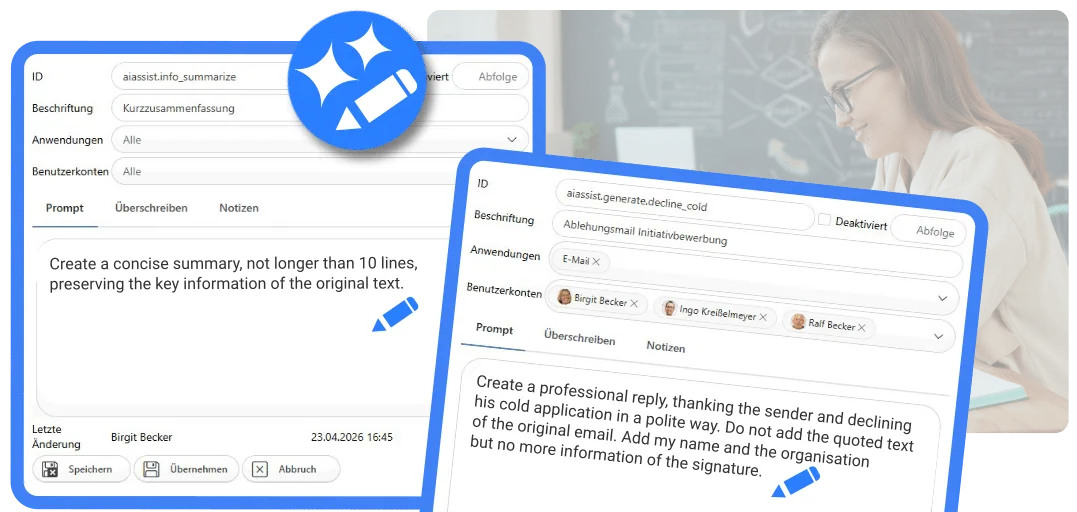
Custom prompts for summaries and reply suggestions in EGroupware
Features

What AI in EGroupware can do

Five building blocks that can be switched on independently.

AI tools for texts

Translate, reword, summarise and suggest email replies – right in the text field. For translations, DeepL can be connected as an alternative.

Intelligent search

Full-text and semantic search across all supported applications: EGroupware also finds entries that do not contain your exact search term, and sorts them by relevance.

Your own prompts for your team

Administrators create their own prompts, test them and release them – for individual applications, groups or everyone. Prompts can also run automatically when an entry is added, changed or deleted.

Capture invoices automatically

The invoicing app reads invoices from photos, scans or PDFs and also recognises the document type and billing period. E-⁠invoicing is part of the Enterprise Line.

Example

A contact from the email signature

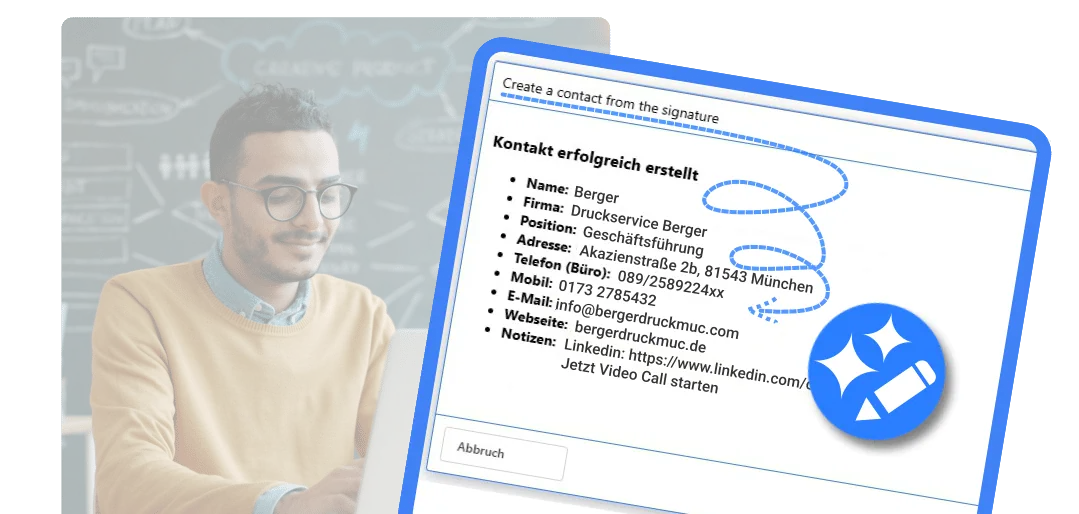
A new enquiry with a full signature? The AI reads name, company, position, address, phone numbers and website and creates a contact from them – or updates an existing one. No more retyping.

NEW As a ready-made prompt in the AI tools of the email app.

More on contacts

Contact created by AI from an email signature
AI assistant

Simply ask EGroupware

The AI assistant based on Open WebUI is integrated into EGroupware. It works with the EGroupware data of the respective user: ask questions in natural language or have new entries created, such as a contact.

This gives your team an AI chat that replaces free chatbots on the internet – and you keep control over which data goes where.

AI assistantON REQUEST

The assistant is available but is not rolled out automatically. Get in touch – we will send you an offer and set it up in your EGroupware Cloud.

Request an offer

Your choice

You decide which AI you use

Without setup, nothing changes and no data leaves your system. AI is enabled per user or group.

EGroupware AI service

Hosted in Germany at IONOS, complemented by DeepL for translations. For cloud and Enterprise Line customers as well as Community Edition users.

Your own model

Run AI models on your own hardware and connect them via Ollama. Then your data never leaves your premises.

Other providers

Any service with an OpenAI-compatible API can be connected. Check where the provider processes your data.

In practice
We had already connected the pre-⁠release version to our local AI server to test the AI features for emails (translation, summarization, etc.). It worked flawlessly.
Samuel Wolf Wolf Maschinenbau AG, Community Edition with its own AI

Read the case study

Frequently asked questions about AI in EGroupware

Do I have to use the AI features?

No. Without setup, nothing changes and no data is sent to external services. You enable the AI features selectively for individual users or groups.

Where is my data processed?

That depends on your choice: with the EGroupware AI service in Germany in the IONOS AI Model Hub, with your own model on your own hardware. If you connect another provider, its terms apply.

Are the AI features also available in the Community Edition?

Yes. AI tools and search are also included in the Community Edition, with your own model or with our AI service. Only the AI import in the invoicing app belongs to the Enterprise Line, like e-⁠invoicing itself.

What do I need on my own server?

For search, MariaDB 11.8, which the EGroupware 26 package update sets up. For semantic search, an embedding model as well – we recommend bge-⁠m3. The details are in the release notes and on GitHub.

Use AI safely

We are happy to advise you on which AI features suit your team and how to run them in line with data protection rules.