
E-⁠invoicing

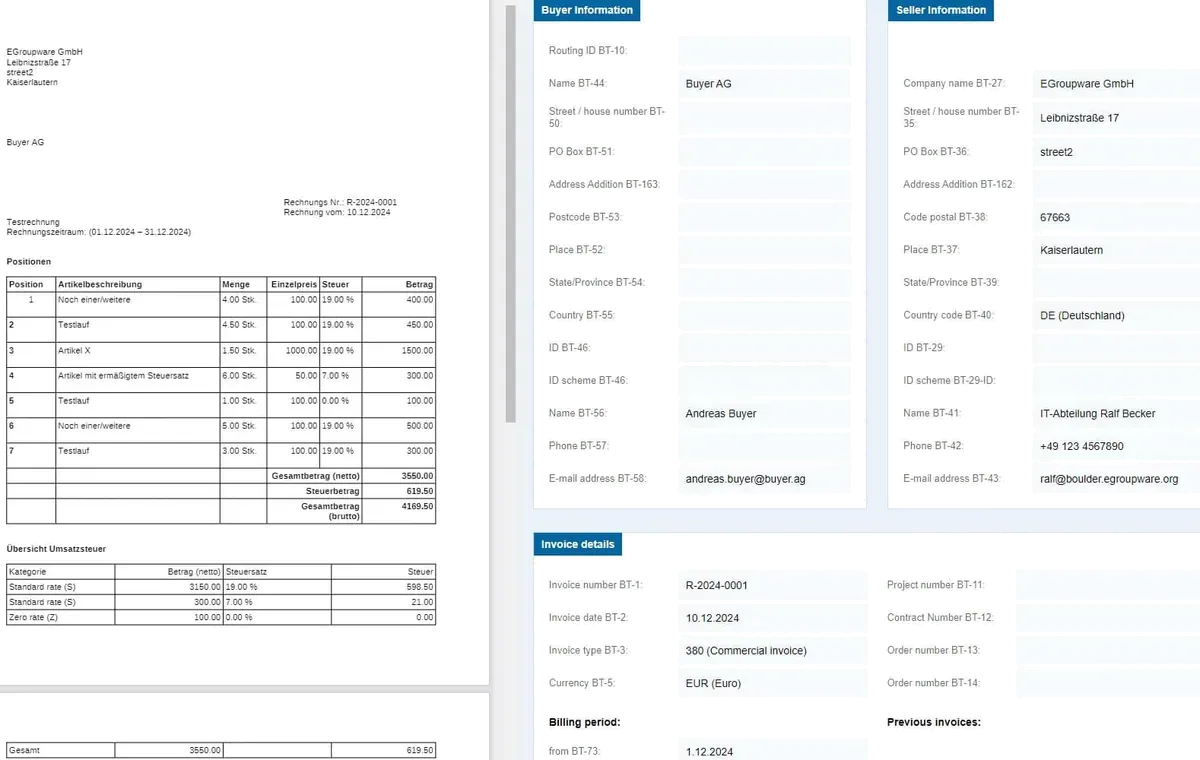
Create and receive electronic invoices in line with the EU standard EN 16931 – as XRechnung or ZUGFeRD. From the quotation and the order confirmation through to the invoice, every­thing stays in EGroupware, with your own layout.

ENTERPRISE LINE Enterprise Line only

  • EN 16931XRechnung and ZUGFeRD
  • AI importReceipts and PDF invoices
  • Quotation to invoiceIn one application
ZUGFeRD invoice with PDF view and invoice data
NEWSince EGroupware 26.4

Import incoming invoices with AI

In addition to e-⁠invoices in XML or ZUGFeRD format, you can now also import scanned receipts and invoices as well as simple PDF invoices without ZUGFeRD data – with AI assistance. Since version 26.7, the import also recognises the type of document, such as invoice or credit note, and the billing period. You check the result and carry on working in the invoicing app.

More on AI in EGroupware

Features

Write, receive and check invoices

Developed for the introduction of mandatory e-⁠invoicing in Germany on 1 January 2025 – for both common formats.

XRechnung and ZUGFeRD

Both procedures under EN 16931 are supported: XRechnung, the pure XML format and standard for public administration, and ZUGFeRD, which combines XML data with a readable PDF.

Your own layout

The PDF part is created from a template document with placeholders, in which you arrange your logo, data and table of items as you like. EGroupware generates the XML part automatically in the required format.

From quotation to invoice

Write a quotation, turn it into an order confirmation and finally into the invoice – without entering the data again.

NEW Quotations and order confirmations since EGroupware 26.4.

Invoice times and tickets

Select time­sheets, tasks or tickets and create an invoice from them. Linked time­sheets become invoice items and are marked as invoiced.

NEW Since EGroupware 26.6.

Items and taxes

Enter items with description, quantity, net price and tax rate as well as payment information and service periods. EGroupware calculates VAT and the total, with a breakdown by tax rate.

Partners from the address book

Define up to three default sellers and select invoice recipients or end customers from the address book. Customer number and VAT ID come from fields you specify yourself.

Interfaces

Properly documented, openly connected

As long as an invoice is a draft, you can change all data and print test copies. Once it has been charged, it can only be cancelled; a notes field records things like payment reminders. For connecting other systems, there has been a REST API for invoices since EGroupware 26.4.

REST API for invoices (GitHub)

Community Edition and Enterprise Line

E-⁠invoicing at a glanceE-⁠INVOICING
Standard
EN 16931
Formats
XRechnung, ZUGFeRD
Documents
Quotation, order confirmation, invoice
Import
XML, ZUGFeRD, scans and PDF via AI
Edition
Enterprise Line
Related

Works together with

Frequently asked questions about e-⁠invoicing

Which formats does e-⁠invoicing support?

XRechnung (pure XML) and ZUGFeRD (PDF with embedded XML data), both in line with the EU standard EN 16931.

Can I also receive and check invoices?

Yes. You import e-⁠invoices in XML or ZUGFeRD format and check them in the app. The AI-⁠assisted import reads in scanned receipts and simple PDF invoices.

Is e-⁠invoicing included in the Community Edition?

No, e-⁠invoicing is part of the Enterprise Line. Our comparison shows the differences between the two editions.

Can an invoice still be changed later?

As a draft, yes. Once an invoice has been charged, it can only be cancelled – the data remains unchanged.

Try e-⁠invoicing free for 30 days

No installation, no risk: request cloud access, invite your team, get going. We are also happy to walk you through the platform in a personal demo first.