
Remote work

At home and at distributed locations, your team works with the same tasks, appointments, files, addresses and projects – in the browser, regardless of your existing IT environment. Video conferences, chat and shared documents are built in, and you reach the office PC via Guacamole.

  • Every­thing in the browserTasks, appointments, files, projects
  • Video and chatFrom the status app and calendar
  • Office PC from homeWith Guacamole and passkey
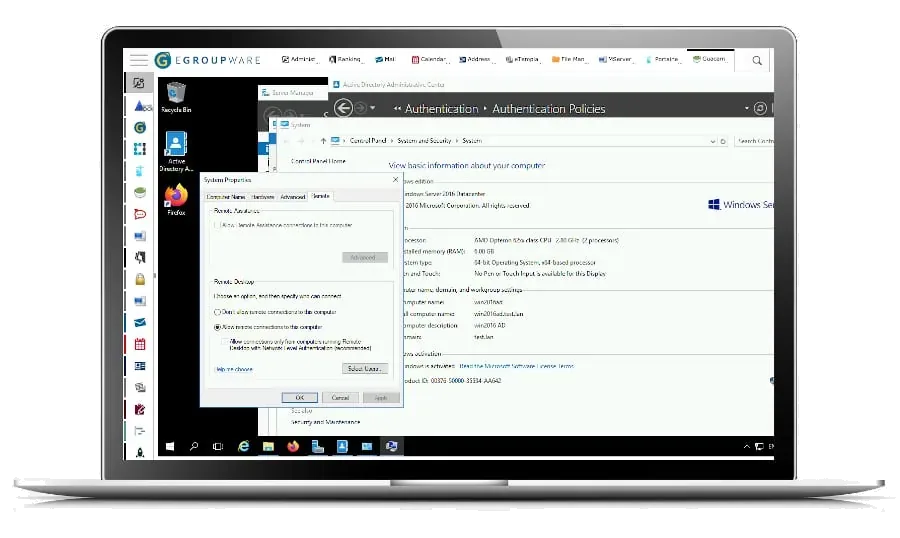
Office PC in the browser via Guacamole in EGroupware
SPECIALRemote work highlight

The office PC in the browser – secured with a passkey

With Guacamole you open your office PC via RDP directly in EGroupware, without having to set up a VPN connection on your private computer. You protect the login with a second factor – a passkey, Windows Hello or a hardware key such as YubiKey, included in the Community Edition since EGroupware 26.8. Administrators decide who may access which desktop.

More on Guacamole

Features

Work from home as you do in the office

Your familiar working environment is available every­where.

All information at home too

Tasks, appointments, files, addresses and projects are available at home just as they are in the office. All you need is a web browser.

Video conferences and chat

Start video conferences and chats straight from the status app or the calendar. You can invite internal and external participants to conferences.

Work on documents together

With Collabora Online you edit documents together in the browser. The files are stored centrally in the EGroupware file manager.

Two-⁠factor login

The administrator can switch on two-⁠factor authentication. To log in, you then also need a code from your smart­phone – similar to the TAN procedure used by banks – or a passkey.

On the move

On smart­phones and tablets too

With mobile access you use all applications in the browser of your smart­phone and tablet. In addition, calendars and contacts synchronise with your devices and with desktop programs such as Thunderbird or eM Client via open standards such as CalDAV and CardDAV; for other devices, the ActiveSync protocol is available via the open source software Z-⁠Push.

Mobile access

Synchronisation

Webinar recording: remote work in practice

Remote work at a glanceREMOTE WORK
Access
In the browser, no installation
Video
Jitsi or BigBlueButton
Documents
Collabora Online
Office PC
Guacamole via RDP, VNC, SSH
Login
Two-⁠factor, with passkeys too
Sync
CalDAV, CardDAV, ActiveSync protocol via Z-⁠Push
Related

Works together with

Frequently asked questions about remote work

Do employees working from home need a VPN?

A web browser is enough for EGroupware itself. You also reach the office PC with Guacamole via the browser, without a VPN on the private computer.

Can external participants join video conferences?

Yes. You invite internal and external participants to video conferences that you start straight from the calendar or the status app.

How is access from home secured?

With two-⁠factor authentication: in addition to the password, a code from your smart­phone or a passkey, Windows Hello or hardware key. Administrators can make it mandatory for everyone.

Try EGroupware free for 30 days

No installation, no risk: request cloud access, invite your team, get going. We are also happy to walk you through the platform in a personal demo first.